RUST编写CH347命令行工具

这几天在学习rust,就想着用rust写一个命令行工具,用来操作CH347芯片。之前已经用python实现了ch347的spi、iic通信接口,相比之下,rust链接c库的方式更加简单,所以就用rust来实现这个工具。

之前的文章:

  1. python封装动态库实例
  2. 调试利器CH347
  3. CH347连接MPU6050
  4. CH347读写SPI Flash
  5. CH347读取MPU6050数据和显示

Rust编写的命令行还没有完全实现,今天记录一个小功能。仓库地址👉 https://github.com/pengwon/ch347-rs

在python版中,没有将gpio和jtag功能封装,这次用rust实现时优先搞了这两个功能。然后用rust实现了一个pwm。

gpio在驱动库中的函数很简单,主要就两个:

1
2
3
4
5
6
7
8
9
10
11
/***************GPIO********************/
// Get the GPIO direction and pin level of CH347
BOOL WINAPI CH347GPIO_Get(ULONG iIndex,
UCHAR *iDir, // Pin direction: GPIO0-7 corresponding bit0-7, 0: input; 1: output
UCHAR *iData); // GPIO0 level: GPIO0-7 corresponding bit0-7, 0: low level; 1: high level

// Set the GPIO direction and pin level of CH347
BOOL WINAPI CH347GPIO_Set(ULONG iIndex, // Specify device serial number
UCHAR iEnable, // Data valid flag: corresponding bit0-7, correspond to GPIO0-7.
UCHAR iSetDirOut, // Sets I/O direction, A bit is 0 means corresponding pin is input, a bit is 1 means corresponding pin is output. GPIO0-7 corresponds to bit0-7.
UCHAR iSetDataOut); // Output data. If I/O direction is output, then a pin outputs low level when a bit cleared to 0, a pin outputs high level when a bit set to 1

在rust中绑定如下:

1
2
3
4
5
6
7
8
9
10
11
12
13
14
15
16
17
18
19
20
21
22
23
24
25
26
27
28
29
30
31
32
33
use libc::{c_int, c_uchar, c_ulong};

#[link(name = "ch347")]
extern "C" {
fn CH347GPIO_Get(fd: c_ulong, iDir: *mut c_uchar, iData: *mut c_uchar) -> c_int;
fn CH347GPIO_Set(
fd: c_ulong,
iEnable: c_uchar,
iSetDirOut: c_uchar,
iSetDataOut: c_uchar,
) -> c_int;
}

pub fn gpio_get(fd: u32, dir: &mut u8, data: &mut u8) -> bool {
unsafe {
CH347GPIO_Get(
fd,
dir as *mut u8 as *mut c_uchar,
data as *mut u8 as *mut c_uchar,
) != 0
}
}

pub fn gpio_set(fd: u32, enable: u8, set_dir_out: u8, set_data_out: u8) -> bool {
unsafe {
CH347GPIO_Set(
fd,
enable as c_uchar,
set_dir_out as c_uchar,
set_data_out as c_uchar,
) != 0
}
}

PWM功能是这样实现的:

1
2
3
4
5
6
7
8
9
10
11
12
13
14
15
16
17
18
19
20
21
22
23
24
25
26
27
28
29
30
31
32
33
34
35
36
37
38
39
40
41
42
43
44
45
46
47
48
49
50
51
52
53
54
55
56
57
pub fn cmd_gpio_pwm(matches: &ArgMatches) {
let fd = *matches.get_one::<u32>("fd").unwrap();
let channel = *matches.get_one::<u8>("channel").unwrap();
let frequency = *matches.get_one::<u32>("frequency").unwrap();
let duty_cycle = *matches.get_one::<u8>("duty_cycle").unwrap();
let pulse_count = *matches.get_one::<u32>("pulse_count").unwrap();

// 调用设置 PWM 的函数(假设存在)
open_device(fd);
if !set_pwm(fd, channel, frequency, duty_cycle, pulse_count) {
eprintln!("Failed to set PWM");
}
}

fn set_pwm(fd: u32, channel: u8, frequency: u32, duty_cycle: u8, pulse_count: u32) -> bool {
let enable = 1 << channel; // 启用 GPIO
let dir_out = 1 << channel; // 设置为输出
let data_out = 1 << channel;

let period = 1_000_000 / frequency; // 周期时间(微秒)
let high_time = period * duty_cycle as u32 / 100; // 高电平时间(微秒)
let low_time = period - high_time; // 低电平时间(微秒)

for _ in 0..pulse_count {
// 设置高电平
if !gpio_set(fd, enable, dir_out, data_out) {
return false;
}
thread::sleep(Duration::from_micros(high_time as u64));

// 设置低电平
if !gpio_set(fd, enable, dir_out, !data_out) {
return false;
}
thread::sleep(Duration::from_micros(low_time as u64));
}

// 如果脉冲数为 0,则连续输出
if pulse_count == 0 {
loop {
// 设置高电平
if !gpio_set(fd, enable, dir_out, data_out) {
return false;
}
thread::sleep(Duration::from_micros(high_time as u64));

// 设置低电平
if !gpio_set(fd, enable, dir_out, !data_out) {
return false;
}
thread::sleep(Duration::from_micros(low_time as u64));
}
}

true
}

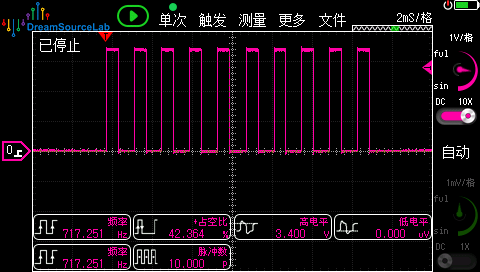
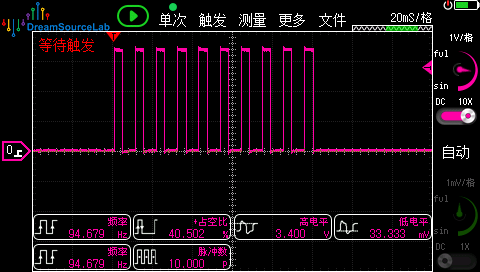
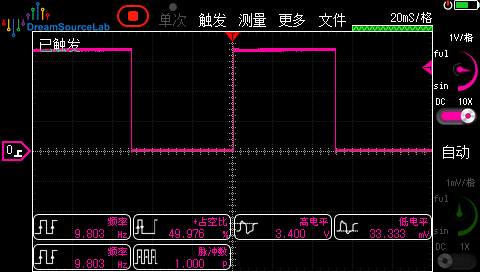
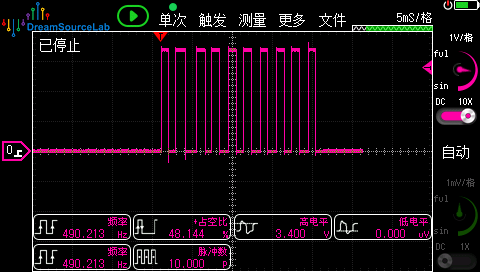
这个版本只实现了单一通道进行测试,在Windows10上,频率到1kHz,频率波动就很大了,实测在600Hz到750Hz之间,占空比相对来说误差还不算大。目前还没在Linux上测试。

在终端中输入以下命令进行测试:

1
cargo run --bin ch347-cli --  gpio pwm --channel 3 --frequency 1000 --duty-cycle 40 --pulse-count 10

输出波形:

1000Hz 40%

100Hz 40%

10Hz 50%

500Hz 50%

测试下来,准确肯定是谈不上了,可以临时应个急。